> ## Documentation Index
> Fetch the complete documentation index at: https://docs.mona.ng/llms.txt
> Use this file to discover all available pages before exploring further.

# Checkout

> 1-Tap checkout solution for web and app.

<div className="flex items-center gap-8">
  <div className="flex-1">
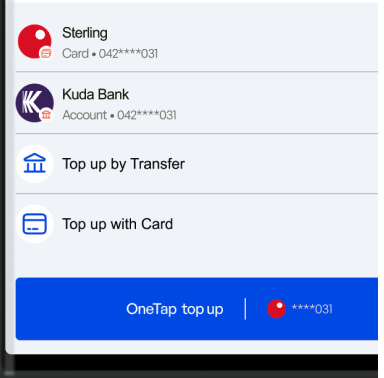
    Mona One Tap allows your customers to make payment within your website or app with just a single tap. We do all the heavy lifting in the background. Your customers' bank accounts and cards will show up natively within your UI and they can complete payment without any additional UI or complex redirect flows, uplifting your conversion dramatically.

    Customers can pay with biometrics using their saved payment methods, while traditional payment methods like card and manual transfer are also supported. The integration is straightforward - just drop in the SDK for your corresponding web or mobile platform without complex setup requirements.
  </div>

  <div className="flex-1">
    <img src="https://mintcdn.com/mona/RVBRvEWdXbwOR1zp/images/monaOneTap.png?fit=max&auto=format&n=RVBRvEWdXbwOR1zp&q=85&s=62100c630ecc804c4ff9b8c9ef46585a" alt="Checkout Hero Light" className="block dark:hidden" width="100%" data-path="images/monaOneTap.png" />

    <img src="https://mintcdn.com/mona/RVBRvEWdXbwOR1zp/images/monaOneTap.png?fit=max&auto=format&n=RVBRvEWdXbwOR1zp&q=85&s=62100c630ecc804c4ff9b8c9ef46585a" alt="Checkout Hero Dark" className="hidden dark:block" width="100%" data-path="images/monaOneTap.png" />
  </div>
</div>

## How It Works

The checkout process follows these key steps:

1. **Create Transaction**: Use the [create checkout session](/api-reference/checkout/create) endpoint to generate a transaction ID and payment URL
2. **Initialize SDK**: Set up the Mona SDK in your app with your merchant key
3. **Launch Checkout**: Pass the transaction ID to the SDK to start the payment flow
4. **Handle Response**: Listen for transaction status updates and handle success/failure states

## Platform Integration

### Installation

<CodeGroup>
  ```javascript Web theme={null}
  <!-- Load the Mona Script (Next.js example) -->
  <Script
    src="/mona_web_embedding.js"
    strategy="beforeInteractive"
  />

  <!-- Or in vanilla HTML -->
  <head>
    <script src="mona_embedding.js" />
  </head>
  ```

  ```javascript React Native theme={null}
  // Install via yarn or npm
  yarn add pay-with-mona-react-native
  // or
  npm install pay-with-mona-react-native
  ```

  ```dart Flutter theme={null}
  // Add to pubspec.yaml
  dependencies:
    pay_with_mona_sdk: ^<latest_version>

  // Run
  flutter pub get
  ```

  ```kotlin Kotlin theme={null}
  // Coming soon - Kotlin SDK
  // Add dependency to build.gradle
  ```

  ```swift Swift theme={null}
  // Coming soon - Swift SDK
  // Add SDK via SPM or CocoaPods
  ```
</CodeGroup>

### Usage

<CodeGroup>
  ```javascript Web theme={null}
  // 1. Create transaction via API, navigate to checkout page
  // Example: /checkout?transactionId={transactionId}&checkoutToken={checkoutToken}

  // 2. Initialize Mona on checkout page
  useEffect(() => {
    const initializeMona = async () => {
      try {
        if (window.MonaClient && containerRef.current) {
          window.MonaClient.init(
            transactionId,
            containerRef.current,
            checkoutToken
          );
        }
      } catch (error) {
        console.error("Failed to initialize Mona:", error);
      }
    };

    initializeMona();

    window.addEventListener("monaComplete", () => {
      router.push(`/success?transactionId=${transactionId}`);
    });

    window.addEventListener("monaFailure", () => {
      router.push("/failure");
    });

    return () => {
      window.removeEventListener("monaComplete", () => {});
      window.removeEventListener("monaFailure", () => {});
    };
  }, []);

  // 3. Container for Mona UI
  <div ref={containerRef} className="w-full" />

  // Note: Complete integration details and additional methods 
  // are not yet documented for Web SDK
  ```

  ```javascript React Native theme={null}
  // Initialize SDK (once per app session)
  PayWithMonaSDK.initialize({ merchantKey: 'mona_pub_5361ecf7' });

  // Usage with config object
  const config = {
    amountInKobo: 5000, 
    merchantKey: 'your-key', 
    transactionId: 'unique-id'
  };

  <PayWithMona
    config={config}
    onTransactionUpdate={(status) => {
      if(status == TransactionStatus.COMPLETED) {
        // handles completed state accordingly
      } else if(status == TransactionStatus.FAILED) {
        // handles failed state accordingly
      }
    }}
    onStatusUpdate={(status) => {}}
    onError={(error) => {
      // Handle error
    }}
    onAuthUpdate={(status) => {}}
  />

  // Alternative usage format:
  <PayWithMona
    amount={2000}
    merchantKey={'mona_pub_5361ecf7'}
    transactionId={'txn_1234534'}
    onStatusUpdate={(status) => {}}
    onTransactionUpdate={(status) => {
      if(status == TransactionStatus.COMPLETED) {
        // handles completed state accordingly
      } else if(status == TransactionStatus.FAILED) {
        // handles failed state accordingly
      }
    }}
    onError={(error) => {
      // Handle error
    }}
    onAuthUpdate={(status) => {}}
  />
  ```

  ```dart Flutter theme={null}
  // Initialize SDK in main.dart
  import 'package:pay_with_mona/pay_with_mona_sdk.dart';

  void main() async {
    await PayWithMona.initialize(merchantKey: {PUBLIC KEY});
    runApp(MyApp());
  }

  // Usage in widget
  late PayWithMona _payWithMona;
  final _sdkNotifier = MonaSDKNotifier();

  @override
  void initState() {
    super.initState();
    _payWithMona = PayWithMona.instance;

    WidgetsBinding.instance.addPostFrameCallback(
      (_) {
        _sdkNotifier
          ..txnStateStream.listen(
            (state) {},
            onError: (err) {},
          )
          ..sdkStateStream.listen(
            (state) {},
            onError: (err) {},
          );
      },
    );
  }

  // Start payment
  final amount = _amountController.value.text.trim();
  final checkoutDetails = MonaCheckOut(
    // checkout details
  );
  _sdkNotifier
    ..setCallingBuildContext(context: context)
    ..setMonaCheckOut(checkoutDetails: checkoutDetails);
    
  await _sdkNotifier.initiatePayment(
    tnxAmountInKobo: num.parse(amount) * 100,
    onSuccess: () {
      nav();
    },
    onError: (errorMessage) {
      showSnackBarr(errorMessage);
    },
  );

  // Payment widget
  _payWithMona.payWidget(context: context)

  // Note: Full parameters for MonaCheckOut and additional 
  // methods are detailed in the complete Flutter documentation
  ```

  ```kotlin Kotlin theme={null}
  // Coming soon - Kotlin SDK integration guide
  // Follow the same pattern:
  // 1. Initialize SDK with merchant key  
  // 2. Create transaction and pass to SDK
  // 3. Handle callbacks for status updates
  ```

  ```swift Swift theme={null}
  // Coming soon - Swift SDK integration guide  
  // Follow the same pattern:
  // 1. Initialize with merchant key
  // 2. Create transaction and launch checkout
  // 3. Handle delegate callbacks
  ```
</CodeGroup>

## Transaction Status Types

Monitor your payment status with these callback types across platforms:

| Event Description      | Web            | React Native                          | Flutter                  |
| ---------------------- | -------------- | ------------------------------------- | ------------------------ |
| Payment successful     | `monaComplete` | `TransactionStatus.COMPLETED`         | -                        |
| Payment failed         | `monaFailure`  | `TransactionStatus.FAILED`            | -                        |
| SDK processing/loading | -              | `MonaSDKStatus.LOADING`               | `MonaSDKState.loading`   |
| SDK ready/idle         | -              | -                                     | `MonaSDKState.idle`      |
| Operation successful   | -              | `MonaSDKStatus.SUCCESS`               | `MonaSDKState.success`   |
| Transaction initiated  | -              | `MonaSDKStatus.TRANSACTION_INITIATED` | -                        |
| SDK error              | -              | `MonaSDKStatus.ERROR`                 | `MonaSDKState.error`     |
| User authenticated     | -              | `AuthStatus.LOGGED_IN`                | `AuthState.loggedIn`     |
| User not authenticated | -              | `AuthStatus.LOGGED_OUT`               | `AuthState.loggedOut`    |
| Not a Mona user        | -              | -                                     | `AuthState.notAMonaUser` |

**Note**: Flutter transaction-specific events are handled via `txnStateStream` - specific transaction events not yet documented.

## Next Steps

1. **Get API Keys**: Contact us to get your merchant public and private keys
2. **Create Backend**: Implement the [create checkout endpoint](/api-reference/checkout/create) on your server
3. **Test Integration**: Use our sandbox environment to test the complete flow
4. **Go Live**: Switch to production keys when ready

Check out our [API Reference](/api-reference/checkout/create) for detailed information about the checkout endpoints.
