> ## Documentation Index
> Fetch the complete documentation index at: https://docs.mona.ng/llms.txt
> Use this file to discover all available pages before exploring further.

# Collections

> Scheduled payments and subscription management

<div className="flex items-center gap-8">
  <div className="flex-1">
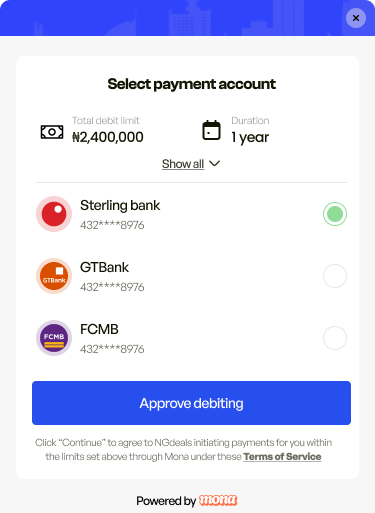
    Mona Collections allows you to set up recurring payments and subscriptions with flexible scheduling options. Whether you need weekly, monthly, or custom intervals, our collections system handles the complexity of recurring billing while providing your customers with transparent control over their payment schedules.

    The system supports both fixed amount and variable collections with flexible scheduling options including weekly, monthly, and quarterly frequencies. Customer consent management ensures transparent terms, while automatic and merchant-triggered debit options give you control over collection timing. Real-time status tracking and webhook notifications keep you informed throughout the collection lifecycle.
  </div>

  <div className="flex-1">
    <img src="https://mintcdn.com/mona/RVBRvEWdXbwOR1zp/images/monaCollect.png?fit=max&auto=format&n=RVBRvEWdXbwOR1zp&q=85&s=aaf1ceca7f648251cc1490938bca3e83" alt="Collections Hero Light" className="block dark:hidden" width="100%" data-path="images/monaCollect.png" />

    <img src="https://mintcdn.com/mona/RVBRvEWdXbwOR1zp/images/monaCollect.png?fit=max&auto=format&n=RVBRvEWdXbwOR1zp&q=85&s=aaf1ceca7f648251cc1490938bca3e83" alt="Collections Hero Dark" className="hidden dark:block" width="100%" data-path="images/monaCollect.png" />
  </div>
</div>

## Collection Types

### Scheduled Collections

Perfect for installment payments with predetermined amounts and dates. Customers see exactly when and how much will be debited.

### Subscription Collections

Ideal for recurring services with consistent billing cycles. Set up once and let the system handle ongoing collections.

## Debit Types

### MONA (Auto-scheduled)

Mona automatically handles the scheduling and execution of debits based on your configuration.

### MERCHANT (Manual trigger)

You have full control over when collections are triggered, perfect for event-driven billing. You still cannot debit more than the consented amount or before the intervals your customer agreed to—you simply control the exact timing of collection execution within those boundaries.

## How It Works

The collections process follows these key steps:

1. **Create Collection**: Use the [create collection](/api-reference/collections/create) endpoint to set up a recurring payment schedule
2. **Initialize SDK**: Set up the Mona Collections SDK in your app with your merchant key
3. **Request Consent**: Use the collection ID (accessRequestId) to request user consent for the collection
4. **Monitor Status**: Handle consent responses and collection lifecycle events

## Platform Integration

### Installation
<CodeGroup>
  ```javascript Web theme={null}
  <!-- Load the Mona Script (same as checkout) -->
  <Script
    src="/mona_web_embedding.js"
    strategy="beforeInteractive"
  />

  <!-- Or in vanilla HTML -->
  <head>
    <script src="mona_embedding.js" />
  </head>
  ```

  ```javascript React Native theme={null}
  // Install via yarn or npm (same as checkout)
  yarn add pay-with-mona-react-native
  // or
  npm install pay-with-mona-react-native
  ```

  ```dart Flutter theme={null}
  // Same installation as checkout
  dependencies:
    pay_with_mona_sdk: ^<latest_version>

  // Run
  flutter pub get
  ```

  ```kotlin Kotlin theme={null}
  // Coming soon - Kotlin Collections SDK
  // Add dependency to build.gradle
  ```

  ```swift Swift theme={null}
  // Coming soon - Swift Collections SDK
  // Add SDK via SPM or CocoaPods
  ```
</CodeGroup>

### Usage

<CodeGroup>
  ```javascript Web theme={null}
  // Note: Web Collections SDK integration not yet documented
  // Follow similar pattern to Checkout:

  // 1. Create collection via API, get collectionId/accessRequestId

  // 2. Initialize collections (method not yet documented)
  // Expected pattern similar to:
  // window.MonaClient.initCollections(accessRequestId, container, ...)

  // 3. Handle events (events not yet documented)
  // Expected pattern similar to:
  // window.addEventListener("monaCollectionConsented", ...)
  // window.addEventListener("monaCollectionConsentFailed", ...)

  // Complete Web Collections SDK documentation coming soon
  ```

  ```javascript React Native theme={null}
  // Wrap your app with the Collections Provider
  <PayWithMonaCollectionsProvider merchantKey={'merchant-public-key'}>
    {/* Your app */}
  </PayWithMonaCollectionsProvider>

  // Use Collections hook
  const {initiate, loading, error} = useCollections({
    onError: (error) => {
      console.error("Collection setup failed:", error.message);
    },
    onSuccess: () => {
      console.log("Collection setup successful!");
    },
  });

  // To start the collection flow:
  <Button onPress={() => initiate("your-access-request-id")} disabled={loading}>
    {loading ? "Processing..." : "Start Collection"}
  </Button>

  // Hook response:
  // initiate(accessRequestId: string) - Call to begin collection flow
  // loading - Boolean indicating if session is in progress  
  // error - Returns Error object if error occurs, otherwise null
  ```

  ```dart Flutter theme={null}
  // Initialize SDK in main.dart (same as checkout)
  void main() async {
    await PayWithMona.initialize(merchantKey: {PUBLIC KEY});
    runApp(MyApp());
  }

  // Collections API
  final _sdkNotifier = MonaSDKNotifier();

  // Create Collection
  await MonaSDKNotifier().createCollection(
    onSuccess: () { /* Show consent UI */ },
    onError: (msg) { /* Show error */ },
  );

  // Collections Consent  
  await MonaSDKNotifier().collectionsConsent(
    bankId: bankId,
    accessRequestId: accessRequestId,
    onSuccess: (result) { /* Handle success */ },
    onFailure: () { /* Handle failure */ },
  );

  // Stream listeners (same as checkout)
  _sdkNotifier.authStateStream.listen((state) {
    // AuthState.loggedIn, AuthState.loggedOut, AuthState.notAMonaUser
  });

  _sdkNotifier.sdkStateStream.listen((state) {
    // MonaSDKState.idle, loading, error, success, transactionInitiated
  });

  // Note: Full Collections implementation details and UI handling
  // are available in the complete Flutter documentation
  ```

  ```kotlin Kotlin theme={null}
  // Coming soon - Kotlin Collections SDK
  // Follow the same pattern:
  // 1. Initialize SDK with merchant key
  // 2. Set up Collections provider/manager
  // 3. Use collection ID to request consent
  // 4. Handle consent callbacks
  ```

  ```swift Swift theme={null}
  // Coming soon - Swift Collections SDK
  // Follow the same pattern:
  // 1. Initialize SDK with merchant key
  // 2. Set up Collections manager
  // 3. Use collection ID to request consent 
  // 4. Handle delegate callbacks
  ```
</CodeGroup>

## Collection Lifecycle

### 1. Create Collection (Backend)

First, create a collection on your backend using the API:

```json theme={null}
{
  "maximumAmount": "600",
  "debitType": "MERCHANT",
  "startDate": "2025-05-22T05:43:00",
  "expiryDate": "2025-06-19T08:42:00",
  "schedule": {
    "type": "SCHEDULED",
    "frequency": "MONTHLY",
    "amount": "200"
  }
}
```

### 2. Request User Consent (SDK)

Use the returned collection ID to request user consent through the SDK.

### 3. Monitor Collection Status

Track collection status through webhooks or polling:

* `NOT_STARTED` - Collection created, awaiting consent
* `ACTIVE` - Collection consented and active
* `PAUSED` - Collection temporarily paused
* `COMPLETED` - All scheduled payments completed
* `CANCELLED` - Collection cancelled

## State Management

### Collection Events

| Event Description             | Web                | React Native                         | Flutter                                  |
| ----------------------------- | ------------------ | ------------------------------------ | ---------------------------------------- |
| Collection consent successful | Not yet documented | Success callback in `useCollections` | Success callback in `createCollection()` |
| Collection consent failed     | Not yet documented | Error callback in `useCollections`   | Error callback in `createCollection()`   |
| Initialize consent flow       | Not yet documented | `initiate(accessRequestId)`          | `collectionsConsent()`                   |
| Operation in progress         | Not yet documented | `loading` boolean                    | SDK state streams                        |
| User authenticated            | Not yet documented | -                                    | `AuthState.loggedIn`                     |

### Platform-Specific APIs

**React Native Hooks:**

* `useCollections()` - Main hook for collection management
* `loading` - Boolean indicating if operation is in progress
* `error` - Error object if operation fails

**Flutter Streams:**

* `authStateStream` - Monitor user authentication status
* `sdkStateStream` - Monitor overall SDK state

## Next Steps

1. **Design Collection Schedule**: Plan your recurring payment frequency and amounts
2. **Implement Backend**: Set up the [create collection endpoint](/api-reference/collections/create)
3. **Integrate SDK**: Choose your platform and implement the consent flow
4. **Test Thoroughly**: Test the complete collection lifecycle in sandbox
5. **Monitor Collections**: Set up webhooks to track collection status changes

Check out our [API Reference](/api-reference/collections/create) for detailed information about creating and managing collections.
